up vote 371 down vote favorite
118
share [g+] share [fb]

In Windows you have a C: drive. Everything labeled beyond that is with the following letter.

So your second drive is D:, your DVD is E: and if you put in a USB stick it becomes F: and the following drive G:. And so on and so forth.

But then, what and where are A: and B:?

link|improve this question
181  
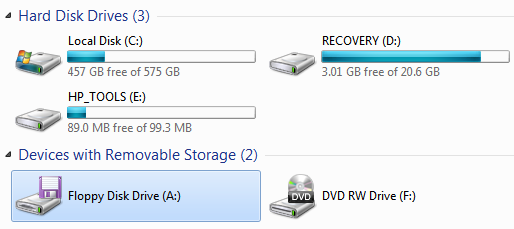
And as an added bonus, you now know what the "Save" icon represents in your favorite program! – Cody Gray Jan 10 '11 at 9:49
354  
Knowing the answer makes me feel so old... – Joe Jan 10 '11 at 11:06
126  
I never anticipated this day would ever come.... – Brad Jan 10 '11 at 16:58
65  
I'm only 19! This can't really be happening, can it? – Jon Purdy Jan 10 '11 at 17:37
93  
"Knowing the answer makes me feel so old... " The fact that there are people who don't know this makes me feel so old... – GendoIkari Jan 10 '11 at 20:00
show 54 more comments
feedback

migrated from stackoverflow.com Jan 10 '11 at 11:12

This question came from our site for professional and enthusiast programmers.

protected by random Jan 11 '11 at 22:45

This question is protected to prevent "thanks!", "me too!", or spam answers by new users. To answer it, you must have earned at least 10 reputation on this site.

17 Answers

up vote 133 down vote accepted
+200

The early CP/M and IBM PC style computers had no hard drive. You had one floppy drive, and that was it. Unless you spent another $1k or so on a second floppy drive, then your system was smokin'! If you only had one drive it was common to boot from one disk, put in the other disk with your programs and data, then run the program. Once the program finished, the computer would request that you reinsert the boot disk so you could use the command line again. Copying data from one disk to the other was a series of "Please insert source disk into drive A:... Please insert destination disk into drive A:... Please insert source disk into drive A:... . . ."

By the time hard drives became cheap, the "expensive" computers typically had two floppy drives (one to boot and run common programs, one to save data and run specific programs). And so it was common for the motherboard hardware to support two floppy drives at fixed system addresses. Since it was built into the hardware, it was thought that building the same requirement into the OS was acceptable, and any hard drives added to the machine would start with disk C: and so forth.

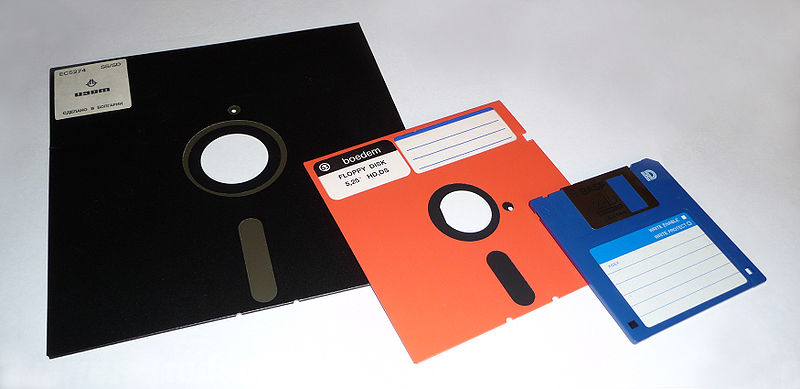
During the transition from 5.25" disks (which were actually, physically floppy) to 3.5" disks (which were encased in a harder plastic shell) it was common to have both drives in one system, and again it was supported on the motherboard with hardware, and in the OS at fixed addresses. As very few systems ran out of drive letters, it was not thought to be important to consider making those drives re-assignable in the OS until much later when drives were abstracted along with addresses due to the plug'n'play standard.

A lot of software was developed since that time, and unfortunately much of it expected to see long-term storage on the C: drive. This includes the BIOS software that boots the computer. You can still attach two floppy drives, boot into DOS 6.1, and use it as you would have in the early 90's, with floppy drives A and B.

So largely the reason for starting the hard drive at C is for backwards compatibility. While the OS has abstracted data storage to some degree, it still treats A and B differently, in such a way that allows them to be removed from the system without altering the OS, caching them differently, and due to early viruses treating their boot sector with more caution than the hard drive's boot sector.

link|improve this answer
14  
+1: Very complete answer – George Bailey Jan 14 '11 at 19:10
Welcome to the ranks of the Stack Athletes. – Dennis Williamson Jan 17 '11 at 6:23
@Dennis - Interesting! I spent some time a year or so ago comparing the top ten users in each site and couldn't easily figure out if any one person was participating significantly on all three 'main' sites. I'm glad to see you've done this, and keep it up to date with the api - it surprises me that there are so few, actually. – Adam Davis Jan 17 '11 at 18:07
@Adam: It surprises me, too. – Dennis Williamson Jan 17 '11 at 18:20
1  
BIOS generally does not deal in drive letters; where did you get the idea that it did? (Maybe some "user friendly" ones make up letters that they think the OS will use, though...) – SamB Jan 21 '11 at 3:13
show 1 more comment
feedback

A: and B: were used for floppy disks.


Edit: Someone asked for pics so here's an 8", 5.25" and 3.5" floppy disk. (8" disks were not used as standard on IBM compatible personal computers.)

floppy disks

link|improve this answer
feedback

Less an answer, more of an anecdote. In this Microsoft article, it says:

"You can assign the letters C through Z to each drive on your computer. A and B are usually reserved for floppy disk drives, but if your computer does not have floppy disk drives, you can assign A and B to volumes."

So when I built a new computer recently with two internal drives, one for the OS and one for data, I thought, hey!, I'll make my data drive "A". I felt all rebellious until I discovered that Windows will not index drives lettered A or B. :( Took me quite a while to figure out what the problem was, but I found some other people who suffered the same issue when they used A or B for a drive. As soon as I assigned that drive a different letter, windows indexed the drive. So much for being rebellious. lol.

link|improve this answer
21  
There was a bug in the Windows XP text-mode installer. It thought that a ZIP drive was a hard disk. A quirk of that got me a fully installed and working XP with the ZIP drive mapped to C:, my CDROM on D:, and the installed OS on E:. I remapped the ZIP and CDROM, leaving me with no C: at all. That machine shook out many faulty installers that assumed that Windows must be C:\Windows in its early years. My new Win7 box is "properly" installed on C: but I miss the quirks. – RBerteig Jan 11 '11 at 9:08
5  
I assign A: B: to thumb drives and memory card drives; great way to relive the removable disks days. – icelava Jan 12 '11 at 11:09
2  
@icelava: Sweet! Maybe I can be a rebel after all. (Haha.) – Nick Jan 12 '11 at 20:35
You mean there aren't 24 letters in the alphabet! OMG! – jmort253 Jan 16 '11 at 12:07
+1 @ icelava, I thought I was the only one that did this. Its good to know I am not alone..... – Moab Jan 16 '11 at 16:13
show 4 more comments
feedback

"Drive letters A and B are reserved for floppy disk drives. However, if your computer does not have a floppy disk drive, you can assign these letters to removable drives."

Source: http://support.microsoft.com/default.aspx?scid=kb;en-us;307844

link|improve this answer
4  
Huh, you can also assign them to non-removable drives. I have a huge non-removable B:\ drive for **B**ackups (previously A:\ for **A**cronisImages). (Argh at SO for having an unusable bolding mechanism...) – romkyns Jan 12 '11 at 2:39
2  
@romkyns: Only in comments. It's quite broken; they use different code for the comments, the live preview for posts and the actual post formatting on the page. Comments even come for free with escaping that's nowhere else to be found :-) – Joey Jan 12 '11 at 15:59
1  
@romkyns: +1 for the bolding rant – Lohoris Jan 13 '11 at 11:32
B for Windows boost drive. – Bratch Jan 17 '11 at 2:45
feedback

Ah... the good ole days.

A: was the first disk device, B: the second, and so on - in CP/M. As somebody else posted, this ran on the 8-bit 8080 and Z-80 machines that pre-dated MS-DOS.

MS-DOS in turn was a 16-bit (8086) knock-off clone of CP/M, or more specifically, CP/M-86, so it used the same drive letter conventions.

Back in those days the only conventions that were pretty much universal were set by CP/M (for example, the disk naming on the Apple-2 and Tandy TRS-80 was something different again... I once used a TRS-80 with 4 floppy drives... oh the power!).

With something like CP/M the first hard drives, when they came out, just appeared as the next available drive letter.

MS-DOS, for reasons best known to itself, allocated 2 floppy drives pretty much universally and placed the hard drive at C:

This is PROBABLY because the early IBM-PC's running MS-DOS all had 2 floppy drives, so this was a natural configuration.

This convention has been preserved since, though as pointed out here numerous times - in windows - you can change this. As far as I know in MS-DOS you can't.


Slightly off topic:

Back in the 1980's it was pretty common on these early machines for disks to be a mixed bag of different types with legend incompatibilities. The IBM-PC imposed a bunch of standards with the format of its 5.25 inch floppies - before that you had all sorts of different arrangements with hard and soft sectoring, number of sectors / track, number of tracks, etc etc.

Data interchange between machines using floppy disks was a very hit and miss affair, which only got sorted with MS-DOS and the IBM-PC. The most reliable way to transfer files between machines back then was to write some programs (in assembler) to to file transfers using the serial port, and then wire them up. It was never very slow, because files were never very big.

My favourites from then were the high density drive my employer bought - it was an 8 inch floppy attached by a huge long ribbon cable. I think it stored about 200K, which was huge when developing software on a machine with 2 floppy drives, each of them 89K. Compiler on one, source and object code on the other. A compilation took minutes while the drives clanked away.

At the time the IBM PC was introduced you could get it running either CP/M-86 or MS-DOS, and there was no clear indication that one or the other would win. Eventually MS-DOS won the day - some bundling deals might have had a bit to do with that. The first IBM machine my employer bought did make things a lot easier... and the port of stuff to MS-DOS was pretty easy - mainly because of the same conventions for disk drive letters, and also because the system calls to read / write files and populate file control blocks (remember FCBs and the weird format they had in memory?) was the same.

link|improve this answer
2  
Remember the odd disk formats? You could squeak 420K onto a "360K" floppy disk by playing with the number of tracks and sectors. 800k on "720k" floppy disks, etc. – Brian Knoblauch Jan 12 '11 at 16:24
Some drives would have enough mechanical clearance internally that with a s/w tweak you could get about 2 extra tracks on and boost capacity by about 10%. You had to buy the exact right brand of drive, though. – quickly_now Jan 12 '11 at 22:39
I never ran across any 5.25" drive that wouldn't let you do 82 tracks on an 80 track disk. I suspect that it may have been a problem on early "compatible" (rather than clone) models though... – Brian Knoblauch Jan 13 '11 at 19:53
feedback

A and B were used for floppy disk drives. As far as I'm aware, there are two because the older computers (with no hard drives) would boot the OS from A:\ and run applications from B:\

link|improve this answer
11  
Actually, there are two of them because the [much] older computers only had one floppy drive and the B: drive was used as a "virtual drive" to allow copying a file from one disk to another in a single-drive system. – Cody Gray Jan 10 '11 at 9:47
12  
It was used for both. If you had two drives, they would be assigned A: and B:. Also, after booting DOS on a floppy, you could usually take out the disk and put in DisplayWrite or whatever, and a lot of those programs had second disks, so you didn't have to switch them all the time. But yes, if you didn't dumpster-dive for a second floppy drive, you could use it as that virtual drive, and it would read like 1K at a time (seemingly) to copy data from one disk to the other. – Brad Jan 10 '11 at 17:01
1  
@Brad: Yes, my brother had a SpectraVideo with 2 floppy drives (this was before PC and Floppy meant 5 1/4" ) – awe Jan 11 '11 at 10:48
3  
Actually, I believe the most important use for two disk drives was copying floppies. I had an Amiga with one drive, and to copy a (880k) floppy, you had to switch back and forth several times, because the system had only 512k total RAM. – sleske Jan 11 '11 at 23:05
2  
512k. Geez. You should have tried copying floppies on a machine with 64K of RAM and one floppy drive. Now that WAS an exercise in both patience and frustration. – quickly_now Jan 12 '11 at 7:47
show 5 more comments
feedback

They are floppy drives. If you're curious to the order of the drive assignments, wikipedia has more information http://en.wikipedia.org/wiki/Drive_letter_assignment

link|improve this answer
Back in the old days, a machine usually had a floppy disk drive and no internal hard disk. Your OS, e.g. DOS (Disk Operating System) came on a floppy which is why floppies are A and B and come before the hard disk, C. – Philluminati Jan 12 '11 at 21:11
feedback

A: is the 5.25" 1.2Mb removable magnetic media, and B: is a more modern 3.5" 1.44Mb drive in my coding machine.

link|improve this answer
29  
"more modern 3.5" 1.44Mb drive" made me smile :-) – JRT Jan 10 '11 at 10:15
42  
Incorrect -- it's whatever type you have installed. It was pretty common to have two 5.25" drives, or even just a 3.5" at A: and no B: (I got an account just to downvote this, but it won't let me downvote 'til I have 125 reputation) – Joe Jan 10 '11 at 14:48
4  
..or a 3" on the Amstrad. Ah happy days!! – BrianA Jan 10 '11 at 14:54
24  
@Joe, he didn't say those letters always mean those drive types, he said that that's how his coding machine was set up. – CarlF Jan 10 '11 at 16:12
3  
@Joe Read my answer before getting all upset. I'm referring to my own setup; my own main coding machine. My build machine is a different story, that one has a 2.88Mb 3.5" drive as A: and a 100Mb Zip drive as B:. And my web server has only a Seagate ST-225 20Mb MFM HDD spinning away at 3600RPM: bit.ly/gBXsnS – KristoferA Jan 11 '11 at 2:59
show 16 more comments
feedback

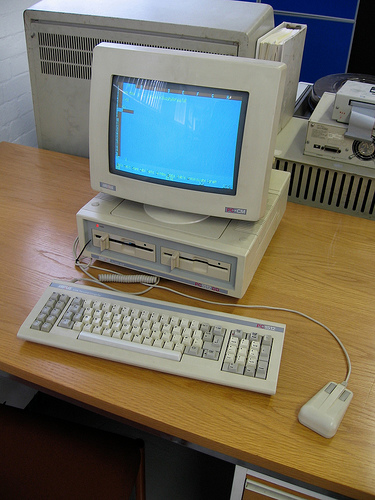
The two horizontal slots on the front of this PC are the A: and B: drives (5.25" floppies in this case). Note that you had to physically "mount" the drive by turning the lever on the front of the drive. Ahh, simpler times.

enter image description here

link|improve this answer
A picture worth a 1000 words – Wesley Werner Feb 4 '11 at 12:06
@Ken Where can I get a mouse like yours? – Oren A Feb 14 '11 at 22:25
@oren Try eBay. This was my first pc, an astrad pc1640. Here's a mouse for sale cgi.ebay.co.uk/… – Ken Feb 14 '11 at 23:11
@Ken Was just kidding, but thanks for the info :-) – Oren A Feb 15 '11 at 9:40
Ah, the good old times! – kiamlaluno Mar 30 '11 at 12:57
show 2 more comments
feedback

If I remember correctly on my DOS systems they were used for floppy drives but B:\ was not generally not an actual physical floppy disk but rather a virtual one.

It was a virtual floppy used when copying a floppy when there was only one drive. So you would copy from A:\ to B:\ but keep taking the source and destination disks out of the same drive as the memory buffer got full.

link|improve this answer
+1 Only answer so far that mentions that few people actually had a B: drive! – Yar Jan 11 '11 at 22:37
6  
Poor people only had B:\ as a virtual. People with money had two floppy drives and the letters to use them. – random Jan 11 '11 at 22:51
@random Later on, people had A: and C: and you only really needed a B: if you wanted both sizes of floppy. – Richard Gadsden Jan 12 '11 at 0:00
A and B were floppy drives. They could be different sizes but need not be. (eg 8 inch and 5.25 inch). – quickly_now Jan 12 '11 at 7:44
2  
I developed the text adventure "Shades of Grey" on a machine without a HDD, but with dual floppy... OS, Editor and AGT parser on one drive, source code on the second... and the PC had a built in 1200/75 modem for "cloud storage" (e.g. uploading my files to Compuserve) – Mark Baker Jan 12 '11 at 9:59
show 3 more comments
feedback

A: was the boot device in the 8-bit CP/M operating system. It predates even the earliest MS-DOS. If you had a second drive, it was B:. A third would be C:, etc. Systems didn't have hard drives then. CP/M was originally targeted to the 8080 processor. CP/M was created in the 1970s. The very first small winchester disk drive was the ST-506 which boasted a generous 5 MB (five megabytes) of storage. They were expensive but they were fast (compared to what we were used to). Oh, and the primitive file system didn't have folders or subdirectories. There was no A:\. It was just A:.

link|improve this answer
1  
AFAIK CP/M was more popular on the Z80. – bart Jan 12 '11 at 22:58
feedback

On my first PC in 1992, A: was the 3.5" floppy, and B: was the 5.25" old-style floppy. Other machines had two 3.5" drives, and having two floppies was fairly common, hence hard drives starting at C: to leave room.

link|improve this answer
feedback

I feel old and I'm only 26. A and B traditionally are floppy drives. C traditionally is the main disk and D traditionally the CD-ROM

My computer at home has CDEF as hard drives and G as DVD RW

link|improve this answer
No, D was not the CDROM. D: existed way before CDs were commonplace. – Xepoch Jan 11 '11 at 1:45
3  
D only became the letter for the CD-ROM in systems that had just 1 HDD and didn't specifically assign a letter to CD-ROM. D for the CD-ROM was common, but not traditional IMO. In fact having D as the CD-ROM could be a problem/pain if you later installed a 2nd HDD which caused drive letters to change... Windows (and possibly other software) would record where they were installed from and request the same drive letter - but it had now changed. – w3d Jan 11 '11 at 23:41
feedback

They are a legacy from the DOS days - A: and B: were the floppy disk drives that were standard on the original IBM PC. C:, the hard drive, was the third disk. Today, of course, nobody has floppies.

link|improve this answer
Hey! I have floppies! And I'm not "nobody". But nobody who doesn't deal with legacy/antique equipment has floppies... – thrillscience Jan 10 '11 at 16:04
@thrillscience - I felt vaguely guilty even while I was typing that. At my last job one of the hardware engineers had a 3.5" floppy USB drive so he could run one of the old schematic capture programs in DOS mode on a PC. Or so he claimed, I never once saw that drive move from under its thick coating of dust. – mtrw Jan 10 '11 at 16:28
1  
I need it for some old MIDI drum-machines and sequencers that have floppy drives, but otherwise still work well. – thrillscience Jan 10 '11 at 18:21
3  
@RBerteig - the more astounding part of that is that you have a working PDP-11. – mtrw Jan 11 '11 at 9:20
1  
IIRC Robert X Cringely said in Triumph of the Nerds (whichever one was the documentary of Accidental Empires, which I have somewhere) that the drive letters came from CP/M, which pre-dated DOS. – John Ferguson Jan 11 '11 at 23:00
show 4 more comments
feedback

A:\ and B:\ were used for the floppy disk drives (remember them?) ;)

link|improve this answer
feedback

A:\ and B:\ still defaults to floppy drives, of course only visible if you have one installed (only have that for fun in some of my virtual machines)

link|improve this answer
feedback

The first pc I used professionally was an Apricot Xen. The internal hard drive was A: and the 3.5" floppy was B:. This was back in the day of MS-DOS 2.11, before Ibm pcs came along.

link|improve this answer
4  
It seems unlikely you were using a MS-DOS based computer before the advent of the IBM PC. The Model 5150 was introduced in 1981 and came with the Microsoft developed PC-DOS 1.0. – tadman Jan 12 '11 at 5:36
1  
It looks like MS-DOS 2.11 didn't arrive until March 1984, so IBM PCs must have been around at the time. Memory fading fast... :-) – dr-jan Jan 12 '11 at 14:09
In Japan there was also the NEC PC-98, which always uses A: for the boot drive. So if you booted from the hard drive, drive C: would be used for the floppy. – Yuhong Bao Jan 12 '11 at 18:25
en.wikipedia.org/wiki/Apricot_Computers 1985, not IBM PC compatible, ran MS Windows 1.0. – Ronald Pottol Jan 13 '11 at 20:03
feedback

Not the answer you're looking for? Browse other questions tagged or ask your own question.